Skip to content

One Thousand And One Parsecs

  • About Me
    • Email List Subscribe
  • About My Books
    • The Vasicek Free Library
    • All of My Books in Series Order
  • Bookstore
    • Cart

Tag: metadata

Updating my backmatter

I read an interesting post on the Bookbub Partners Blog a couple of weeks ago, where they shared some of their findings on backmatter optimization. “Backmatter” is all the stuff that goes in the back of the book, like teasers, first chapters, buy links, author bios, and the like.

Way back when I first started publishing, I decided to write a unique author’s note at the back of each of my books. I’ve gotten a lot of positive feedback on that from my readers, so I intend to keep doing it (though they may get a little shorter as time goes on).

I’ve also avoided putting sample chapters for other books, mostly because of some advice I read on KBoards early on about how that changes the “percentage read” bar at the bottom of the ereader. A lot of people on KBoards complained about how annoying it was when a book ended at only the 90% mark, or 85% mark.

That was anecdotal, though. Bookbub crunches a lot of data, and their report says that sample chapters are more effective. So be it.

I’ve also been putting links to the book pages on my blog, where I’ve condensed all of the ebookstore links for each book. If you put a buy link to Amazon and try to upload that book to iBooks, they will block it. Likewise for many other stores. The laziest solution for this was to just have a page on my blog that links to all the stores, so that I can upload the same file everywhere.

Again, however, the Bookbub data show that you sell a lot more books when your backmatter links directly to that store. So even though it means making a separate file for each publishing platform, that’s what I plan to do.

And it’s actually not as hard as I thought it would be. I upload to Kindle Direct Publishing, Kobo Writing Life, Draft2Digital, and Smashwords, so I only need four different files for each book. Because of the modular way epubs are structured, each sample chapter is an .xhtml file with a link at the end, and all I need to change really is the link. Drop the sample chapter at the back of the master file, export as epub, swap out for the other sample chapter with the different store link, export again. A little tedious, but not overly difficult once all the .xhtml files are made.

Point is, I’m making a big change to my publishing process, and it’s going to take a while for all these changes to trickle down through my catalog. But the only thing that’s changing is that I’m taking out the book teasers and adding a sample chapter. All of the author’s notes are staying, and nothing in the actual book content is changing.
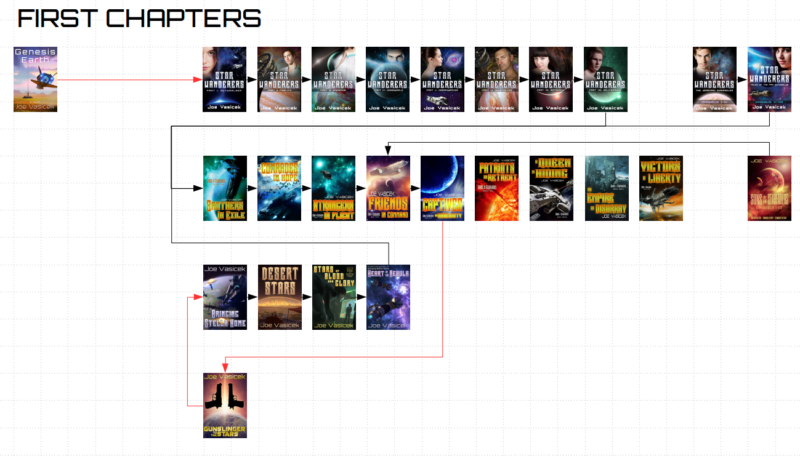
Most of the prep work is already done. I’ve mapped out where all the sample chapters need to go, and made all the .xhtml files that I need to add to the master epubs. Now I just need to make the new epubs and upload them, which I plan to do one series at a time.

All told, this is probably going to take another 8-12 man hours to accomplish. But that’s on top of all the other stuff I need to do, like writing. If I can put in half an hour to an hour each day, this project should get done by the end of the month.

So that’s what I’ve been up to on the publishing end. This is one of those things where it’s best to make a decision early on in your career, because it’s a lot more work to change course midway. Of course, you should always be willing to change that decision based on data, which is what I’m doing here.
Published April 17, 2017
Categorized as Uncategorized Tagged backmatter, Bookbub, indie publishing, metadata, publishing advice

K is for Keywords

I’ll take a quick break from formatting and uploading to do today’s A to Z post. Since B was on blurbs and C was on cover art, I figure it’s only natural that K should be on keywords. Cover art and book blurbs are definitely important in making a book stand out in all the right ways to a reader, but what good is that if they can’t find it? That’s where keywords come in.

In the Author Earnings Report, Hugh Howie and an anonymous data analyst took a snapshot of the top 7,000 genre books on the Amazon kindle store (romance, mystery, thriller, and science fiction & fantasy) and found, among other things, that the self-published books received better reviews on average than the legacy published books. There was a lot of hooplah about this in the indie world when the report came out, and while it’s just speculation, the most convincing reason for this that I’ve heard is that indies are generally smarter with their metadata, such as categories and keywords.

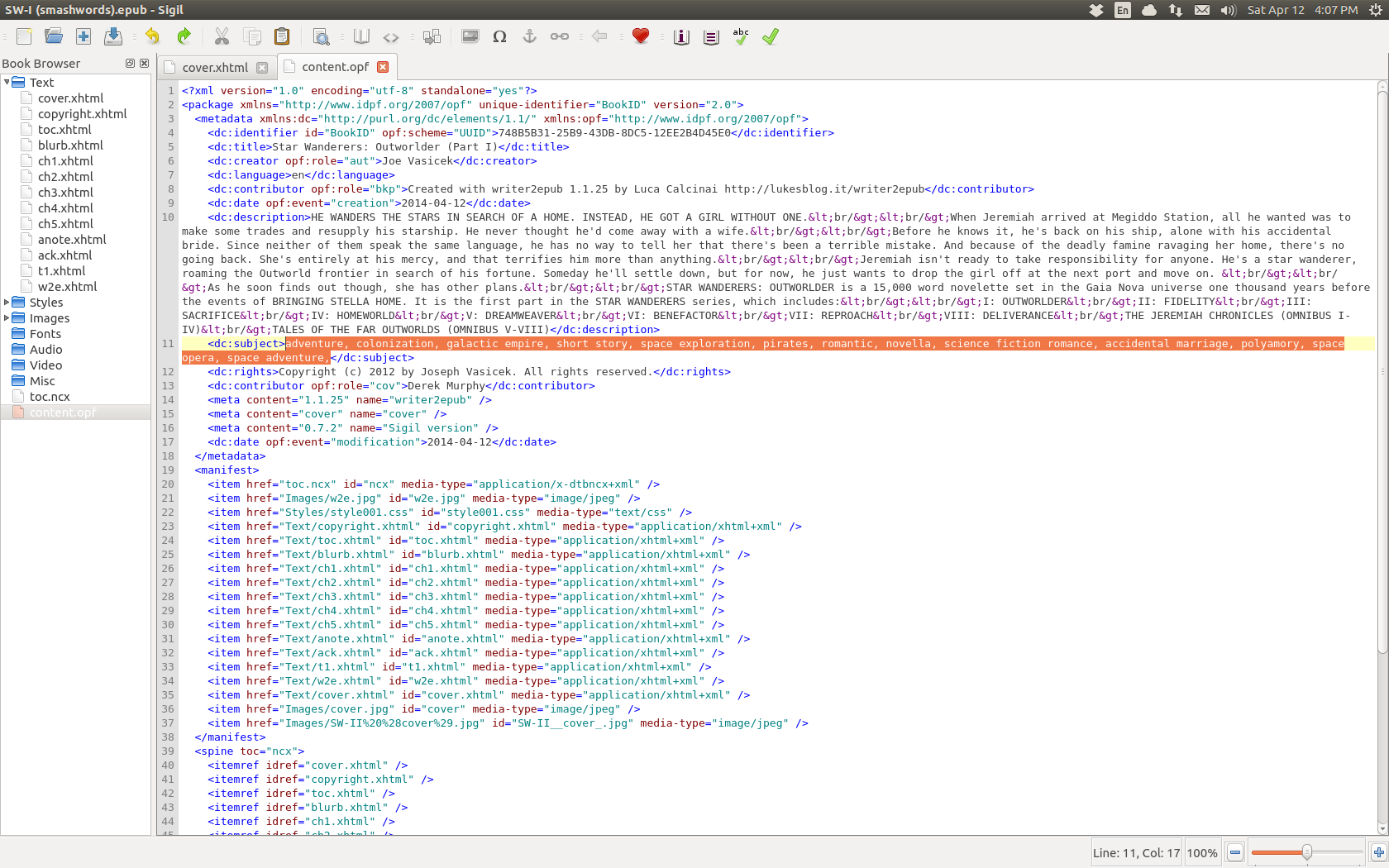
“Metadata” is data that’s about your book, as opposed to its actual content. In an ebook, there’s an xml file that ends with the extension .opf which contains the book’s metadata, as well as its organization and a guide to help your reading device navigate it. Within the metadata, there’s a tag called dc:subject, which is where the keywords go. For example, here’s a screenshot of the .opf for Star Wanderers: Outworlder (Part I), with the keywords highlighted:

Screenshot from 2014-04-12 16:07:06

Okay, so maybe that’s more than you needed to know. What can I say? With all the ebooks I’m reformatting, I’m knee deep in the stuff.

If all of this sounds too technical, don’t worry–all of the publishing platforms, including Amazon KDP, automatically overwrite your .opf file with whatever you put in the keyword field when you publish (On KDP, that’s on the first page with the book details, just under the categories). So even if you don’t know how to format an ebook, you can still add keywords pretty easily.

But what words should you actually put there? That’s the thousand dollar question. For the first two years, I just threw the first few words about the book that came to mind. Needless to say, that’s not the best way to do it.

Keywords are important because they help people who are searching for books like yours to find it. For example, if you search the kindle store for “romantic space opera,” Star Wanderers: Outworlder (Part I) comes up on or near the top (I’m not sure if an Amazon search will show different results for different people, based on reading preferences–it certainly wouldn’t surprise me if it did). That’s because “romantic” and “space opera” are two of my keywords. All the other books in the series have the same keywords, so if you scroll down the search results you should be able to find them.

But it goes a lot further than that. There are actually a bunch of smaller subcategories which you can only get into through careful use of keywords. The book details page on KDP allows you to choose two categories for your book, but if you look on the page for Outworlder, you’ll find it listed in the following categories:

  • Books > Literature & Fiction
  • Books > Romance > Science Fiction
  • Books > Science Fiction & Fantasy > Science Fiction > Space Opera
  • Kindle Store > Kindle eBooks > Romance > Science Fiction
  • Kindle Store > Kindle eBooks > Science Fiction & Fantasy > Science Fiction > Colonization
  • Kindle Store > Kindle eBooks > Science Fiction & Fantasy > Science Fiction > Galactic Empire
  • Kindle Store > Kindle eBooks > Science Fiction & Fantasy > Science Fiction > Space Exploration
  • Kindle Store > Kindle eBooks > Science Fiction & Fantasy > Science Fiction > Space Opera

Now you can see why I used “colonization,” “galactic empire,” and “space exploration” as keywords. Those aren’t categories that you can choose from the drop down list, but you can get into them through keywords.

Finally, when browsing the science fiction section of the Kindle store, you’ll notice a bunch of options that readers can use to narrow the search. Under characters, this includes “pirates,” and under genre, this includes “romantic”–hence why I chose those as keywords. By browsing this way, readers can actually drill down to a tiny, tiny section of the store, where your book can really stand out. But the only way to make sure your books are in there is through a strategic use of keywords.

Since Amazon limits you to seven keywords when you upload your book, it’s important to keep a few things in mind. First of all, you shouldn’t include a word that’s already part of the title, subtitle, series, or author name. For years, I put in “Joe Vasicek” as a keyword, just in case someone did a search for that. Turns out, Amazon already listed me at the top of the search results since that data is included in my author name.

Second, you shouldn’t use keywords to describe data that’s nested in other data. For example, I don’t use “science fiction” as a keyword because that’s included in the FICTION > Science Fiction > Space Opera category, which I chose from the drop down list. Likewise, I didn’t use “science fiction romance” as a keyword because I figure the combination of “romantic” and my other keywords should cover that.

I’m still pretty new when it comes to keywords, and there’s a lot I have left to learn. For example, what’s the best way to do keywords across a series? Is it better to keep the same ones, to make sure that they’re all grouped together in the same categories, or to use different ones that are more accurate to each book? For Star Wanderers, I’ve used the same exact keywords for all the books, because they’re all direct sequels or parallaxes, and thus are much closer together. My Gaia Nova novels are more like loosely connected stand-alones, so for the books in that series I do different keywords.

Keywords are also something you have to keep an eye on, because the best practices change. For example, Amazon could restructure their subcategories, splitting or merging them into entirely new ones. They could also change the drill down options on the kindle store. Amazon is constantly experimenting with new ways of doing things, which means that we should be experimenting as well.

And that’s just Amazon. I don’t even know what the best practices are for Kobo, or Smashwords, or Barnes & Noble. That’s yet another thing on my long, long publishing to do list.

So there you have it. I hope that’s helpful, if you’re just dipping your toes into the world of self-publishing. And if you have any knowledge to add to this, by all means please do so in the comments below!

Published April 12, 2014
Categorized as Star Wanderers Tagged Blogging A to Z challenge (2014), discoverability, ebook formatting, indie publishing, keywords & categories, metadata
One Thousand And One Parsecs
Proudly powered by WordPress.