For those of you who read on Kobo and live in the territories listed above, I have some great news! Kobo is running a short-term 50% off sale, and almost all of my books are eligible! Just use the following coupon codes on the following dates:
Canada October 28th – October 31st Promo Code: CA50SALE
United States/Australia/New Zealand October 27th – October 30th
Promo Code: GET50SALE
United Kingdom
October 30th – November 2nd Promo Code: UK50SALE
Here is a list of all of my Kobo books that are eligible. You can also check them out using the links from the book pages. Basically, the coupon code works on everything $2.99 (£1.99, C$3.99, A$3.99, NZ$3.99) and higher.
The cool thing is that Kobo will still pay me full royalties on every sale, so this is a great way to support your favorite authors and get a good deal in the process!
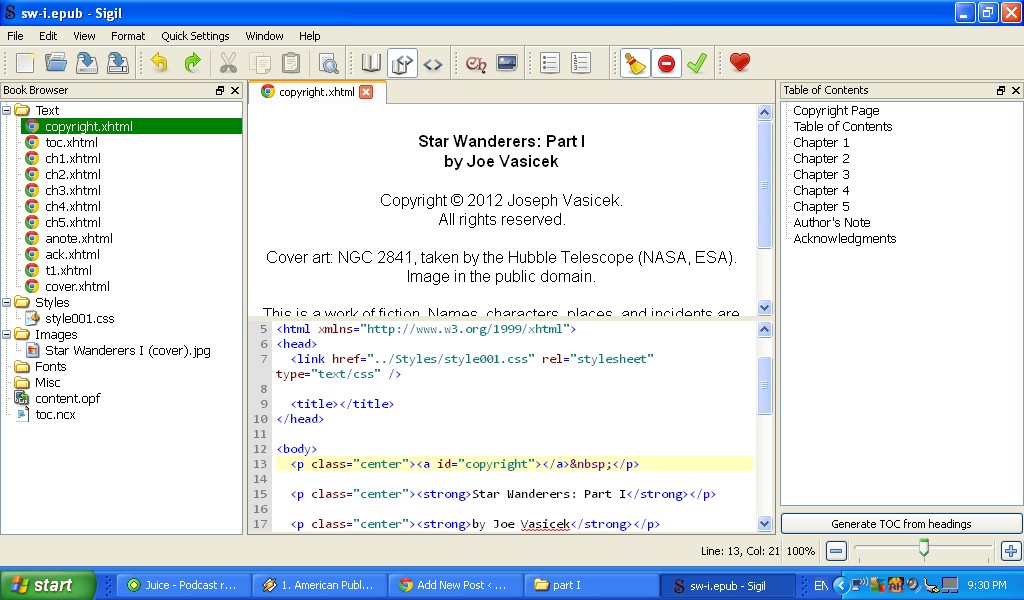
Under the hood of my latest ebook release, Star Wanderers: Part I.
So a couple of days ago, I set out on a quest to figure out a better way to build an ebook. In the process, I ended up learning WAY more about ebooks than I’d bargained for, in the most awesome of possible ways. Seriously, I don’t think I’ve ever felt so empowered as an indie author as I do right now.
My old process was extremely convoluted. It basically involved saving my manuscript as HTML (introducing all kinds of excess code) and using four or five programs to cobble together a Frankenstein-like creation, with bolts sticking out of its forehead and extra arms and fingers sticking out of weird places. The tools I was using were like blunt instruments, and I was operating them blindfolded.
So what changed? Well, three things:
I added the Writer2ePub plugin for Open Office / Libre Office,
I downloaded an open-source epub editor called Sigil, and
I watched this video:
So what did I learn?
<geek>
First of all, that ebooks are WAY simpler than I thought they were. An epub is basically a zipped folder containing HTML files for the text, jpgs/gifs for the cover and any interior illustrations, a CSS stylesheet, maybe some extra fonts (if you want to get fancy), and two additional additional files ending in .opf and .ncx that look a lot like HTML files.
So why is this so exciting? Because it means that if you know HTML/CSS, you can build a fully functional epub file using only notepad, windows explorer, and the command prompt. THAT’S IT! And if you want to learn HTML, you can do so for free at w3schools.com.
Basically, an epub is structured just like a website, except that an ebook reader reads it instead of an internet browser. If you can build a website, you can build an epub with very little trouble. Even if you can only tweak a website, you can build an epub with very little trouble.
</geek>
In other words, the barriers to entry for ebook publishing are ridiculously low. If you’re patient and a good learner (or hell, just a good learner), there is not a single reason why you need to spend any money to format your ebooks, upload them directly to retailers, or do anything else. Using tools that are 100% available for free, you can create a product that looks every bit as professional as anything coming out of New York–in many cases, even more professional.
So what’s my new process?
1) Format the master file in Open Office.
This includes adding the copyright page and table of contents, adding anchors (in OO they’re called “bookmarks”) and hyperlinks, adding the author’s note and acknowledgments, any teasers, etc. I save the file in open document format, add “Smashwords Edition” on the copyright page and save it as a .doc file for Smashwords.
At some point, I’m going to upgrade to Libre Office, but I haven’t gotten around to it yet. When I do, it’ll basically be the same thing.
2) Export as .epub using the Writer2ePub plugin.
I cannot tell you how happy I am with this Open Office / Libre Office plugin. It pulls out all of the unnecessary formatting and breaks up every chapter into a separate, cleanly coded HTML file, all bundled together into a fairly simple epub. SO MUCH BETTER THAN SAVING AS HTML. Or Mark Coker’s “nuclear option,” for that matter.
I don’t add the cover at this point, though. Writer2ePub adds some weird stuff if you do it that way, and I find it easier just to code it manually in the next step.
3) Finalize the .epub in Sigil.
Sigil is basically just an HTML editor with some extra functionality that allows it to build an epub from those HTML files. It’s easy to learn, simple to use, and tells you exactly what’s wrong when something breaks. Unlike Calibre and Mobipocket Creator, you can always see what’s going on underneath the hood. Simple, clean, and elegant. I love it.
This is the phase that takes the most work. I add the cover, fill in the relevant metadata, tweak the CSS stylesheet for margins and indents, add the book guides, build the table of contents, etc. If you want to know exactly how I do this, let me know and I’ll write up a post on it later. It’s a little technical, but not too difficult. Like I said, if you know even a modicum of HTML, you can figure it out.
Once this step is finished, I have the final epub version of my book. I upload that to Pubit! and Kobo Writing Life, and just about anywhere else outside of Amazon where I sell my book. Someday soon, Smashwords will hopefully allow you to directly upload an epub, at which point I’ll do that here as well.
4) Convert to .mobi with KindleGen.
Amazon uses its own proprietary format for ebooks, unlike everywhere else, which takes the open source epub format. This is probably because of all the weird and funky stuff that Amazon likes to track for data collection purposes, although honestly, who knows? A mobi file is about twice as large as an epub, and I suspect that that’s the reason.
KindleGen is a free program that Amazon has made available to developers in order to facilitate conversion of epubs and other ebook formats into mobi. It’s a command line tool, which means that you have to get a little retro to use it. But hey, I grew up in the 90s with DOS, so it’s actually kind of nostalgic.
Once you’ve got KindleGen installed to c:\kindlegen, all you basically need to do is go to the file folder where your ebook is saved and enter the following command:
c:\kindlegen\kindlegen mybook.epub -c1 -verbose
“mybook.epub” is whatever you named your epub file, “-c1” stands for standard DOC compression, and “-verbose” stands for verbose output (whatever that means). There are other options you can enter, but I’m not sure what they do yet. All I know is that if you want to convert from epub to mobi, this will give you a clean result.
There are a few small things that get lost in the conversion, so you need to add them as redundancies in the epub. The biggest one I’ve noticed so far is the paragraph indents: if you go into the CSS stylesheet using Sigil and add p { … text-indent: 2em; … } that should fix it.
And that’s it! Once this step is finished, I’ve got the final mobi version and can upload that directly to Amazon and my kindle. Once that’s done, my book is available from every major ebook retailer in every country in the world. Total time = maybe an hour (plus however long it takes for the retailers to publish the files to their stores).
I know it’s 2012 and this is old news by now, but do you have any idea how cool this is? With one hour of work and two or three programs, all of which are available for free, I can produce a clean, professionally formatted ebook, and sell it around the world instantaneously with a marginal cost of zero.
And now, because I took the time to learn how to use the tools, I can be confident that there aren’t any bits of rogue or useless code in it either. The only “black box” is really the mobi format, but I could probably crack that and figure it out if I wanted to.
So yeah, needless to say, I am extremely happy to be an indie writer. 🙂
So after a month of waiting, Kobo’s publishing platform, Writing Life, is finally up! I just finished uploading all of my titles (except my short stories–I’ll just continue to distribute through Smashwords for now). Genesis Earth is already available, and the others should be up soon.
For those of you who are readers, this means that you’ll be able to find my books on Kobo almost as soon as they go up on Amazon. The formatting will (hopefully) be cleaner, since I’ll have direct control. Prices will generally be the same as on other platforms, but when I change the price on Amazon, I’ll change it simultaneously on Kobo, too–no waiting for weeks on end for the price to drop.
For those of you who are writers, I’ll be sure to keep you updated with thoughts on my experience. So far, it looks pretty good: the royalty rates are better than Amazon (70% for titles priced $1.99 – $12.99, 45% for all other titles), the publishing process is faster, and the upload formats (.epub, .doc, .docx, .mobi, and .odt) are generally more flexible. Downsides include a higher minimum threshold for direct deposit ($100 or every 6 months), fewer category choices, and what appears to be a forced 2:3 aspect ratio for cover art.
Besides that–oh, look, Bringing Stella Home and Journey to Jordan just went up too! Man, that’s fast! And it looks like the aspect ratios went back to 3:4, so I won’t have to redo the covers. That’s a relief! So yeah, I’ll be sure to keep you updated.
Also, in preparing my books for upload to Kobo, I discovered some pretty egregious formatting errors for the Barnes & Noble copies of Bringing Stella Home and Sholpan. I’m not sure what happened–probably it had something to do with an older version of Calibre or Open Office, since I was overseas at the time and only had access to my netbook. So yeah, if you downloaded one of the broken copies, just shoot me an email and I’ll send you the updated epub version, no questions asked.
In general, I need to revamp my publishing process. Currently, it resembles jumping through a ring of fire while juggling half a dozen angry poodles. Open Office, Mobipocket, Notepad, Calibre, KindleGen, DOS prompts, and Kindle for PC–yeah, I’d better get on that. If you have any suggestions for free/open source software that does .mobi and .epub, please let me know.
In other news, I finished my first pass through Stars of Blood and Glory, and should be finished with draft 2.0 by the end of the week. After that, it’s back to Star Home and Star Wanderers.
 For those of you who read on Kobo and live in the territories listed above, I have some great news! Kobo is running a short-term 50% off sale, and almost all of my books are eligible! Just use the following coupon codes on the following dates: